This Christmas was a wild one for our family. We purchased a 50-inch Plasma HDTV from Panasonic, upgraded our home theatre system to 1000-watt Pioneer speakers, got a new TV stand, purchased a Toshiba HD DVD, bought a Xbox 360 and Playstation 3, and finally a Harmony 880 Remote. We had so many new electronic devices it would be so overwhelming to control them all with 7 or 8 remotes so we picked up an all-in-one for half the original price on Boxing Day. At Costco though, you can buy it for $170 CDN, regular price.
Utility
The look and feel of the remote is great, but the button placement could use some work. For  example, the Play button is not in between the fast forward and rewind, rather, it's one up and to the right of the fast forward button. My misfortunes usually happen when I'm rewinding and then I choose to play without looking down and hit the fast forward button accidently. The volume and channel buttons are placed perfectly and make for easy channel surfing and quick boost to the volume. At first, when I saw the number placement for entering channel numbers, I thought it would be a pain in the neck to move my hand all the way down there and I would loose the grip on the remote. Gladly that's not the case, and entering numbers was a breeze because of the curve at the bottom making the length seem dwarf. Lastly, the LCD screen is amazing and makes changing media a walk in the park.
Ease of Use
At the very top of the remote you have the Power button (which gets used seldomly), and the Activities and Help button. The 
Once you've got everything ready to go, click the Activity you'd wish to start and it'll be up and running within 5 seconds. Then it will go to that Activity menu and it will replace the specific remotes associated with that activity. For example, with an Xbox 360, you get their remote in that one, with all the options displayed on the LCD screen. When watching TV, the remote will control the volume, switching channels, and if you are a Rogers subscriber, you'll have the "A" "B" "C" buttons on it, as well as many others. One problem I found with the remote and which made it harder to use is this. Say the remote does not start the Activity properly, like not switching on a device; you can press Devices, and switch it on manually, but then you don't have access to all those buttons that you normally do with the Activity. You can keep on switching back and forth from devices but that is quite annoying. Luckily, the remote doesn't do it often and won't do it all if you do one thing. Point the remote dead on towards the devices throughout the time the remote starts the Activity.
Look and Feel The remote comes with a charger, thus making it rechargeable and a fast one at that. It takes approximately 3 hours to fully charge the remote from dead. The remote feels good in the hands with curves at the right places. The aesthetics of it are perfect except the LCD screen could use some work as it isn't clear.
Conclusion
Would I recommend it to someone? Yes I would. If you have more than 4 remotes then it would be a great time saver and leaves more stress behind. Setting it up is a breeze if you have a general understanding, and using it is just as easy. If you do need help though, there is a guided step by step, interactive help button located at the top of the remote. For $170CDN, I'd pick one up now before it's too late. Note to PS3 users, the Harmony 880 remote is not compatible with it due to bluetooth issues.

Three other airlines including Alaska Airlines are

American Airlines passengers will have nationwide internent access using devices that support 802.11a/b/g. Their goal is to to offer internet access at the start of 2008 but there is no mention how many airplanes will be equipped. They have already begun testing on its fleet of Boeing 727-200 aircraft in August. AirCell is building their network as well as Virgins. They own 3MHz of the 800MHz spectrum and they've already demonstrated in-flight WLAN capabilities which took place in 2005. Virgin America first announced its in-flight broadband service plan in
September, and the company hopes to have its all of its planes
connected "sometime in 2008."
By the end of 2008, Internet access will be close to a standard on commercial airlines except for the low-cost airlines like JetsGo and Air Transat. The next airline to move onto the scene should be Air Canada and possibly WestJet. Definitely, this has revolutionized the airline industry and should provide a boost to the sagging industry.
Silverthorne is Intel's first crack at making a brand new processor aimed at ultramobile PCs except for those small cell phones like the iPhone. Intel is not only working on this processor, but an update to it's upcoming Penryn family using a 45nm notebook processor, plus Montevina, a sub-notebook processor with 40% smaller components. Intel will make its integrated Wi-Fi/WiMax chip set available as an option with Montevina-based notebooks. As always, Intel is looking to shake up the industry and as usual, it will go off with a bang.
Around June 2008, Intel will release a new platform, Menlow, that will use Silverthorne and another chip set, Poulsbo. Using their new technology of a 45nm chip, which is being drooled at by other chip makers such as ATI/AMD, they will hopefully drill a new market wide open between the cell phone and notebook industries.
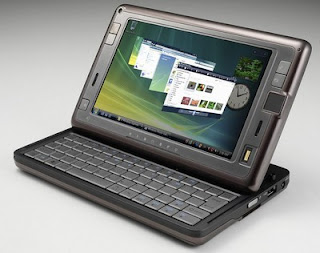 Currently there are more than 15 designs in Intel's arsenal with 2 in production by Christmas and 4 by the second half of 2008. The image above is the HTC Shift which will use Intel's Ultra Mobile PC chip (UMP) also in development and should be released later next year.
 On Tuesday November 27, 2007, Google announced a new initiative to produce renewable energy at low costs to the consumer, but more importantly, cheaper than coal. Officially known as RE
 Eliminating coal, is another step to be taken in reducing green house gases, with coal supplying more than 40% of the worlds electricity, Google is taking a huge step forward. Mentioned in their Press Release many times is "Cheaper than Coal" and that is huge, because no government will change their power structure unless it is cheaper and more reliable. China and India might be the first countries to switch.
My brother is a good friend of mine and so he tells me about all the purchases he plans out like his high performance computer, video games and now a superb GPS. The Magellen Maestro 4050 is an amazing device, and if you're in the market for one, you shouldn't at all be surprised about what I'm going to tell you. I'm going to go from obvious to cool features on this GPS.
First off there are pre-loaded US, Canada, and Puerto Rico maps all displayed on a 4.3 inch screen. It is 5. 0 (l) x 3.75 (w) x 0.88 (h) and contained in a high quality plastic case. It can run 2 hours with continuous use but isn't important because mostly you'll have it plugged into your car at all times.
My brother just bought a BMW 328xi with a load of feature including Bluetooth and an integrated feature called BMW assist. BMW Assist system offers safety, security and convenience services at the touch of a button. Using advanced technology, BMW Assist connects you with a trained response specialist, much like OnStar, to help you with almost everything, from an emergency situation to directions and traffic information. How does this relate to the Magellan Maestro 4050? If you didn't pay for some of the luxuries you can add to a car, then this GPS will provide at least some of those for a fraction of the cost. Bluetooth, hands-free calling, and Built-in AAA Travel Information, this will rival an integrated navigation system.
I haven't even got to the best part yet. Next is the included services offered by Magellan. TrafficKit can be added onto the GPS with applicable subsciption fees. Basically, TrafficKit will tell you traffic updates faster than your local radio. Finally, there is voice recognition software. There are two YouTube videos that I found to be quite good. One shows a close-up of the GPS being used with not the best function(click here) and then the other one is more of a review of the voice recognition with a demo(click here).
Compared to TomTom there are some advantages and disadvanges. For one, TomTom has mapshare which is really helpful when you find an error, you can help correct it, and therefore in turn, you'll have a more reliable map. Magellan though has the amazing Voice Command and wins my heart.
I looked at the big three in the industry, Magellan, TomTom, and Garmin and took into account their routing engine and map accuracy. There are two different mapping data providors for these 2 companies, NAVTEQ and Tele Atlas. NAVTEQ is better for North America and comes standard on Magellan units and Garmin (Garmins is several years old but soon to be updated) while TomTom uses Tele Atlas.
I'm not done yet. Here are some pros and cons about the Magellan Maestro 4050.
Pros
- Great, easy to use interface
- notifies you well in advance of turns
- 4.5million P.O.I.S that is better than larger databases on other GPS systems
- Multi-destination routing with route optimization
- QuickSpell, to speed up entering text (no real need to use it with voice commad)
- Loud speaker
- Allows you to see your current location w/ time, speed, direction, & allows you to save your current location
- Four routing methods to choose from
- Only GPS on the market that includes AAA's TourBook information
Cons
- GPS voice is hard to understand and is the worst text-to-speech of Magellan, TomTom, and Garmin
- Cannot enter a street address using the voice command
- Hard to use voice commands while driving
- Docking system is hard to use
- Map colour scheme makes it hard to read
- Sometimes wakes up without you saying "Magellan"
- Icons are transparent, making them hard to see
- Traffic Reciever is big
- P.O.I lookups don't use QuickSpell
- Bluetooth is difficult to hook up with your device
- Map Screen only uses night mode, all other screens stick to day
Retailling at $499, I think I'd pick one up for Christmas.
 Pandora's Box was always a secret and when it was finally released and let out into the world, everybody except the US got to look into it. For some time though, Pandora was seen by peering Canadian eyes but last May it was shut down to Canadians. Now there is a website entitled Last.Fm and is open to Canadian residents and the rest of the world. This is a huge relief because I dearly missed Pandora and it's beautiful choices of music. There restrictions to it originally which included prohibiting you to scroll more than 5 times for a set amount of time. Last.Fm does not have many restrictions but they do get a little annoying on their website. For one, you can search up a song/artist on their website, but you can only it for 30 seconds and it doesn't allow you to play the full version on your downloaded software even though it says you can. The stations though play some unique songs like the Rolling Stones version of Into You-Fabolous.
 My pet peeve of this software is you can only search for Artists and Tags where you are almost dispersuaded from searching for albums and titles. I suggest you experience becuase right now you don't have an alternative if you're a Canadian resident living in Canada. Let me know what you guys think about the alternative and comment away.